
The Lumen Theatre: Website & Staff Admin
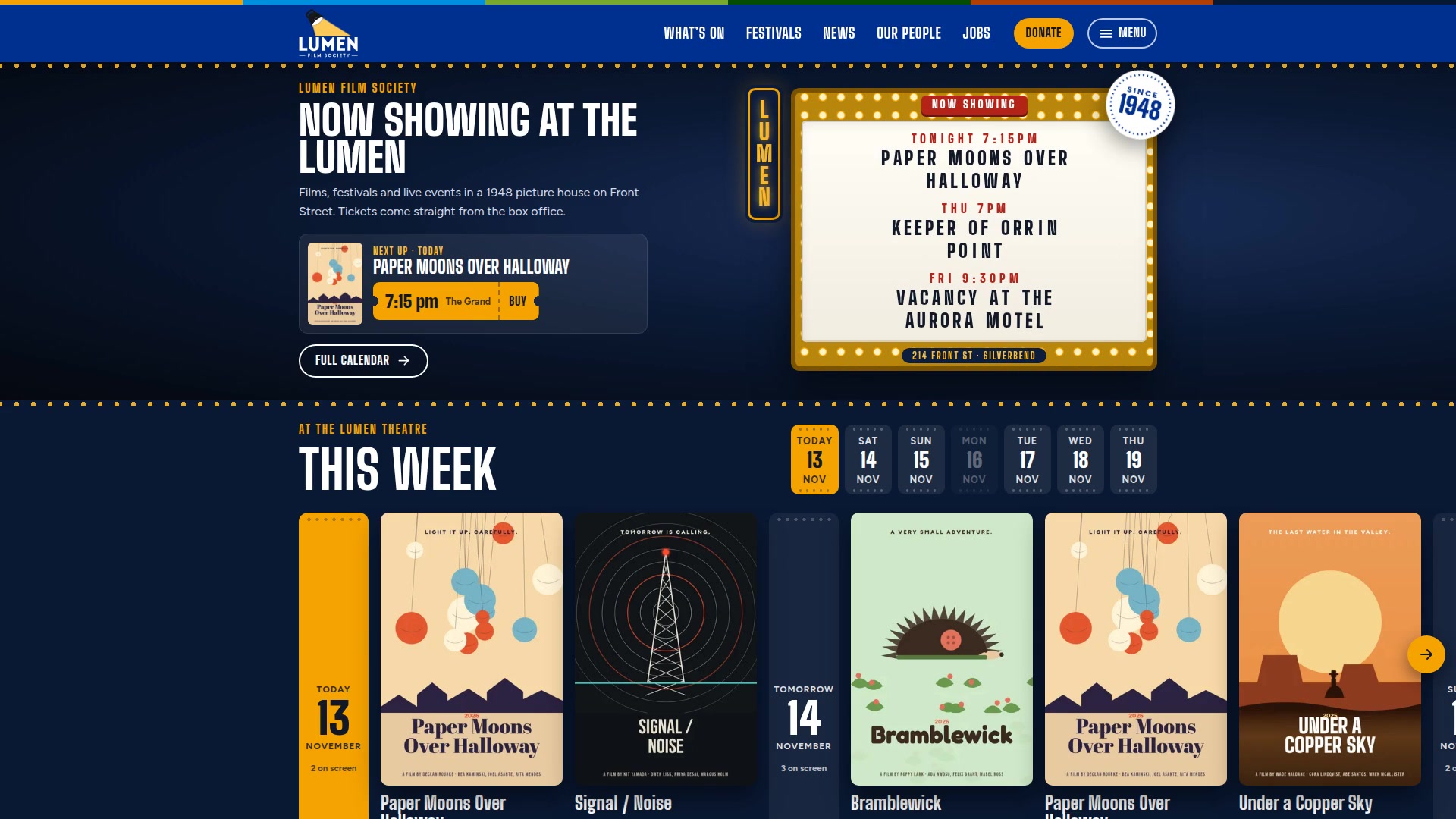
The Lumen Theatre is a non-profit picture house that doesn’t exist, with a website that really works. I created it as a concept: a cinema site built around the question everyone asks, “what’s on tonight?”, and around the memberships, donations, volunteers and rentals that keep a small theatre’s lights on.
The homepage opens on a marquee that spells out tonight’s films letter by letter. Six festivals each get their own animated look, and I drew the logo myself: a stage lamp whose beam flickers now and then, like a tired bulb.
Behind it sits an admin a small staff could run without a developer: showtimes that arrive from the box office on their own, posters, festivals, news, jobs and every page, with three levels of team access.
- Role
- Creative direction, logo design, UX and visual design, motion direction
- Built with
- Claude Code (an AI coding partner), PHP, HTML, CSS and JavaScript
- Tested with
- Google Lighthouse and automated browser tests at phone and laptop sizes
- When
- Fall 2026 · a concept
The brief
A small non-profit cinema runs on a handful of staff, a crowd of volunteers and a programme that changes every week. Its website is often where someone decides whether tonight is a movie night.
So I gave this site three jobs:
- Answer “what’s on tonight?” in one look, on a phone, in the lineup outside.
- Make the non-profit side as inviting as the films. Memberships, donations, volunteers and rentals are what keep the lights on.
- Run without a developer. Showtimes arrive from the box office on their own, and the team changes everything else themselves.
The Lumen is fictional. The theatre, the town of Silverbend, BC, the films, the people and the festivals are all made up, so the site can show every real feature without showing anyone’s real films.
A lamp with a tired bulb
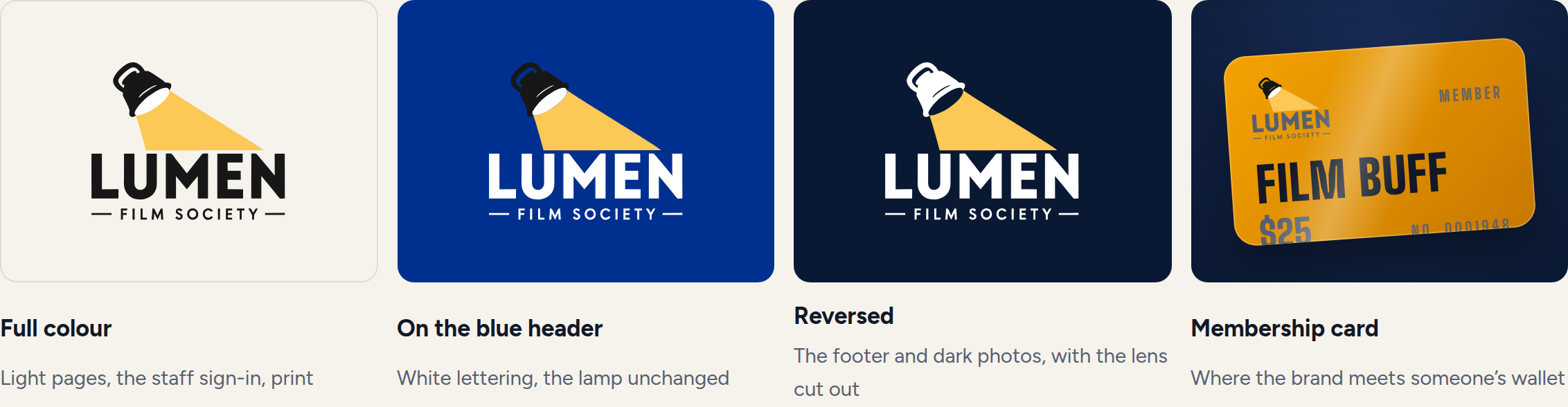
I drew the Lumen’s logo myself: a stage lamp throwing its beam onto the name. A lumen is a unit of light, so the whole identity is about the moment the light hits the screen.

On the website, the beam flickers every so often, like a lamp with a tired bulb. It cuts out for a beat and sputters back. Two loops of different lengths overlap, so you can never quite predict the next flicker. It holds still for anyone who has asked their phone to reduce motion.
The opening shot
The homepage opens like walking up to the theatre at night: a marquee with a letter board spelling out the next three films, straight from the box office. The letters drop into place one at a time, the way someone on a ladder changes the sign.
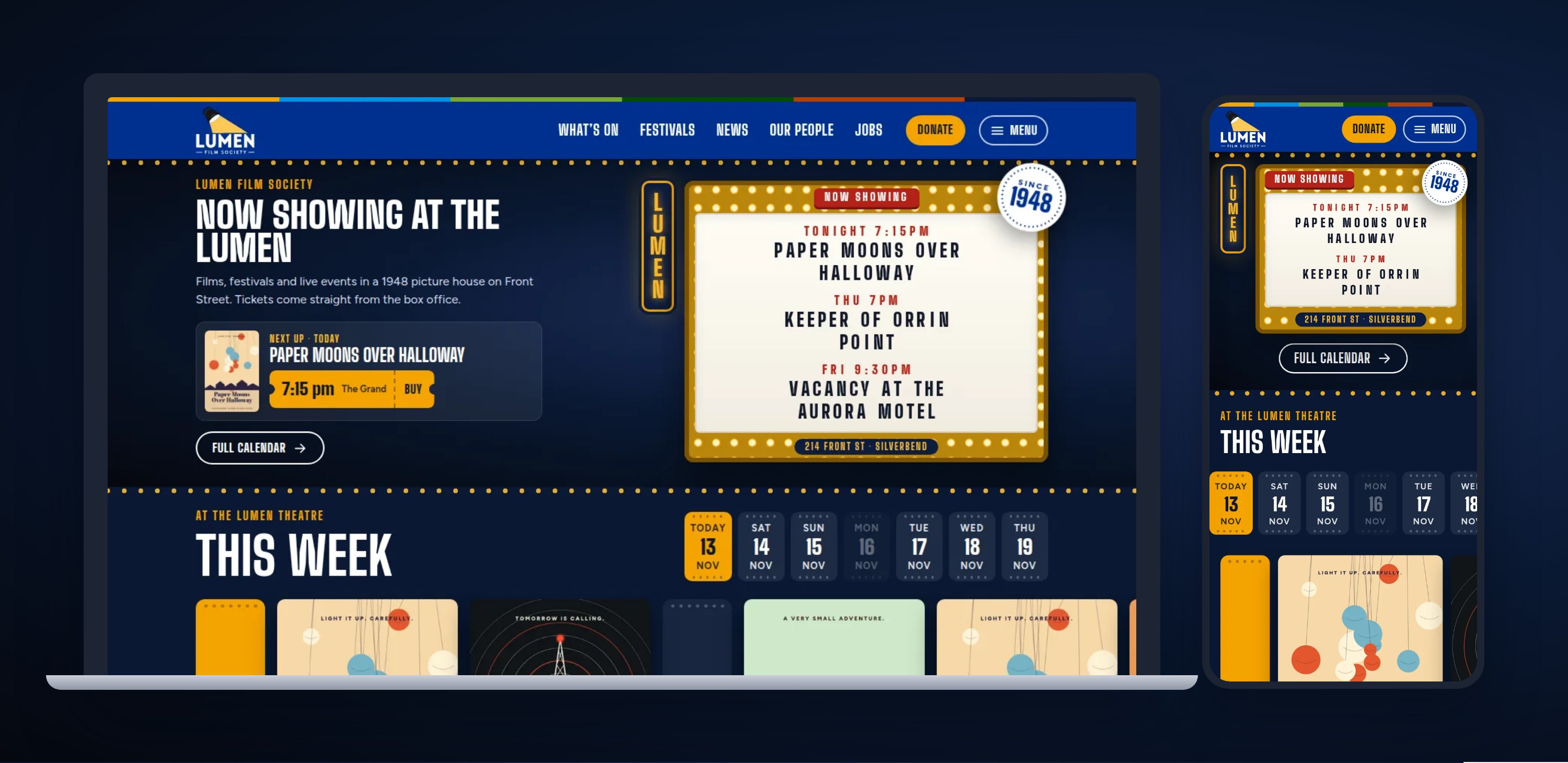
- Always tonight’s films. The board reads TONIGHT, TOMORROW or a day of the week, worked out from the real showtimes.
- Featured first. Staff can mark a film as featured, and it earns a spot on the board.
- Their own line. One box in the admin puts a message under the films, like HAPPY BIRTHDAY LUMEN!
- One tap from a ticket. The very next showing sits beside the sign with its Buy button.
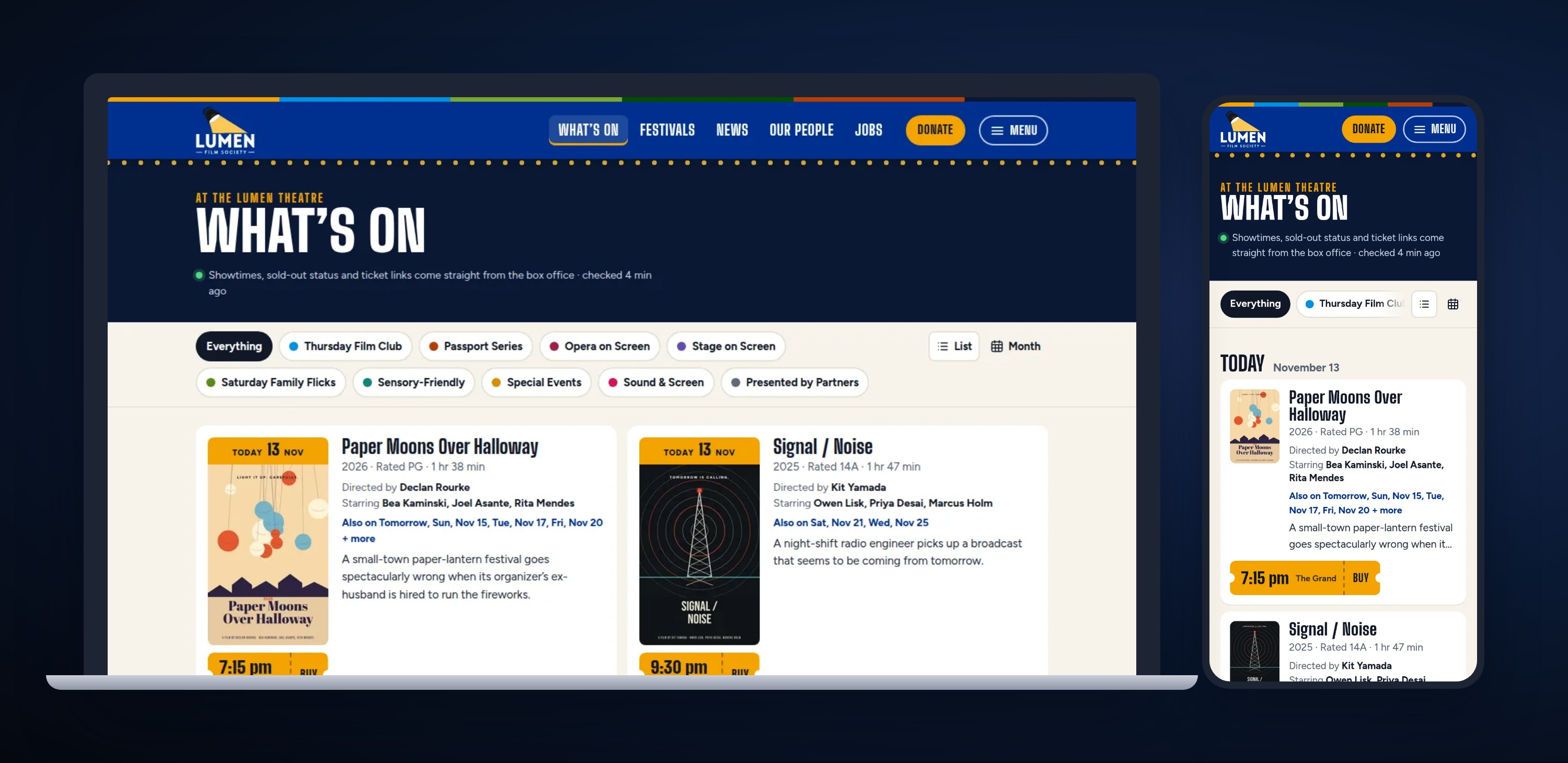
What’s on, at a glance
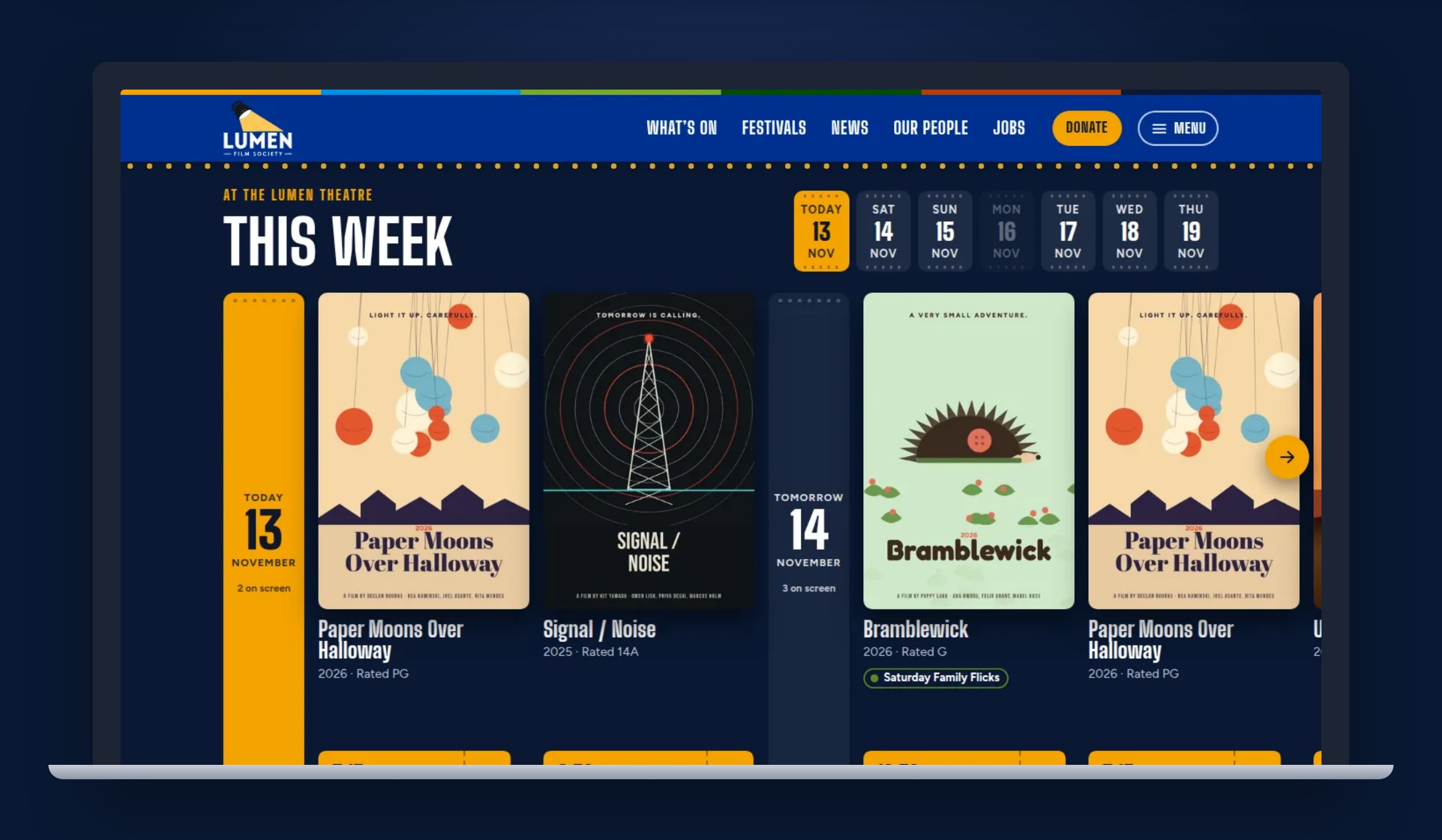
Every showtime is a ticket stub with the time, the screen and a Buy button, so it reads the same everywhere: on the homepage, the calendar and each film’s page.
This week
A wall of posters, one day after another, with a marker for each day. Tap a day and the wall slides there; scroll the wall and the day lights up.
The calendar
Everything on sale, day by day, filtered by series: Thursday Film Club, Opera on Screen, Saturday Family Flicks and six more. Each film shows its other dates too.
Film pages and tickets
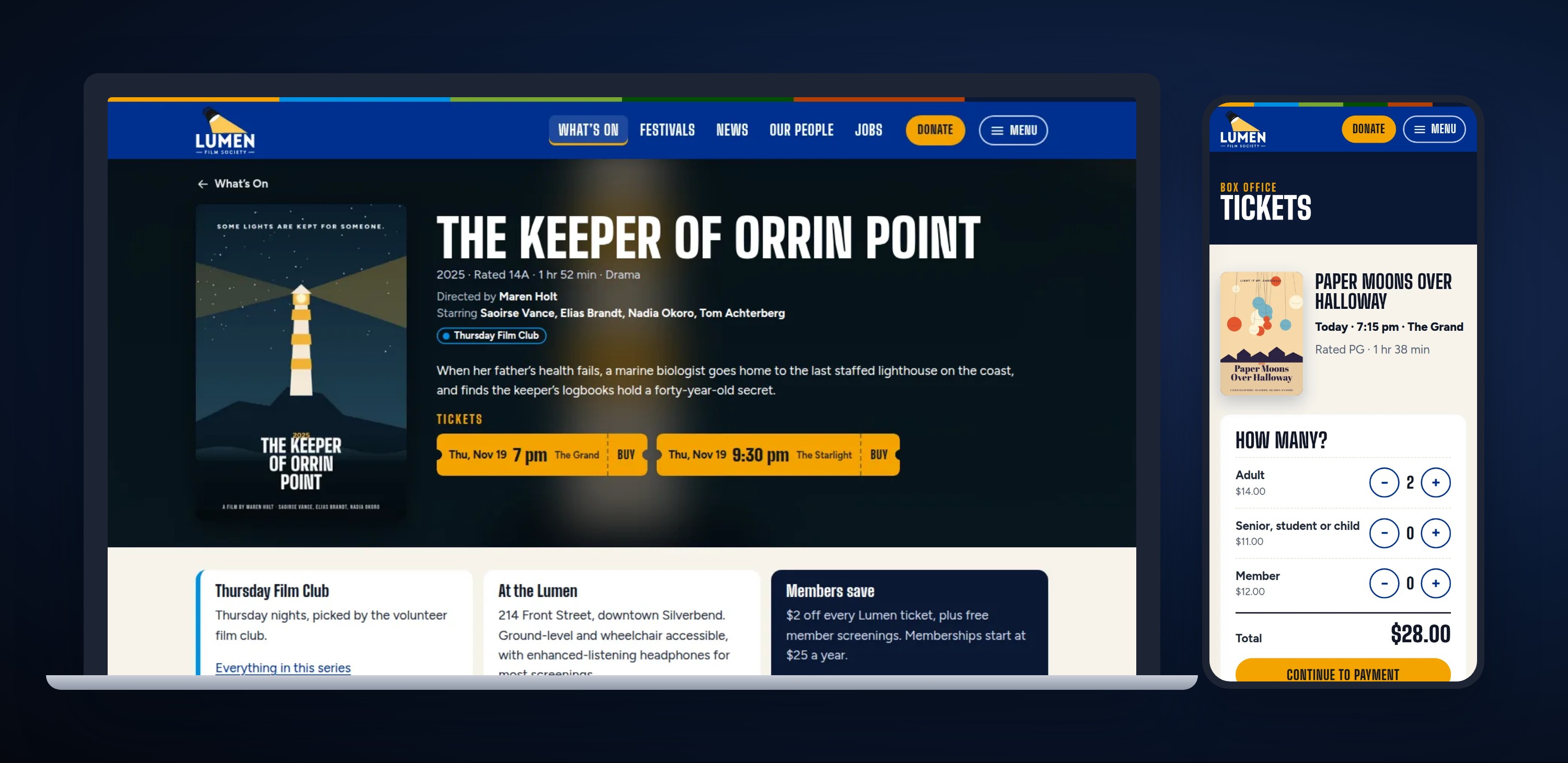
Poster, credits, every showtime and a nudge to become a member. Buy opens a checkout with ticket types and a running total. This one is pretend, so it explains that instead of taking payment.
Six festivals, six looks
Festivals are the big nights of a cinema’s year, so each one opens with its own look. They share one layout underneath, and each gets a different motion idea, the way one rig can carry different characters.
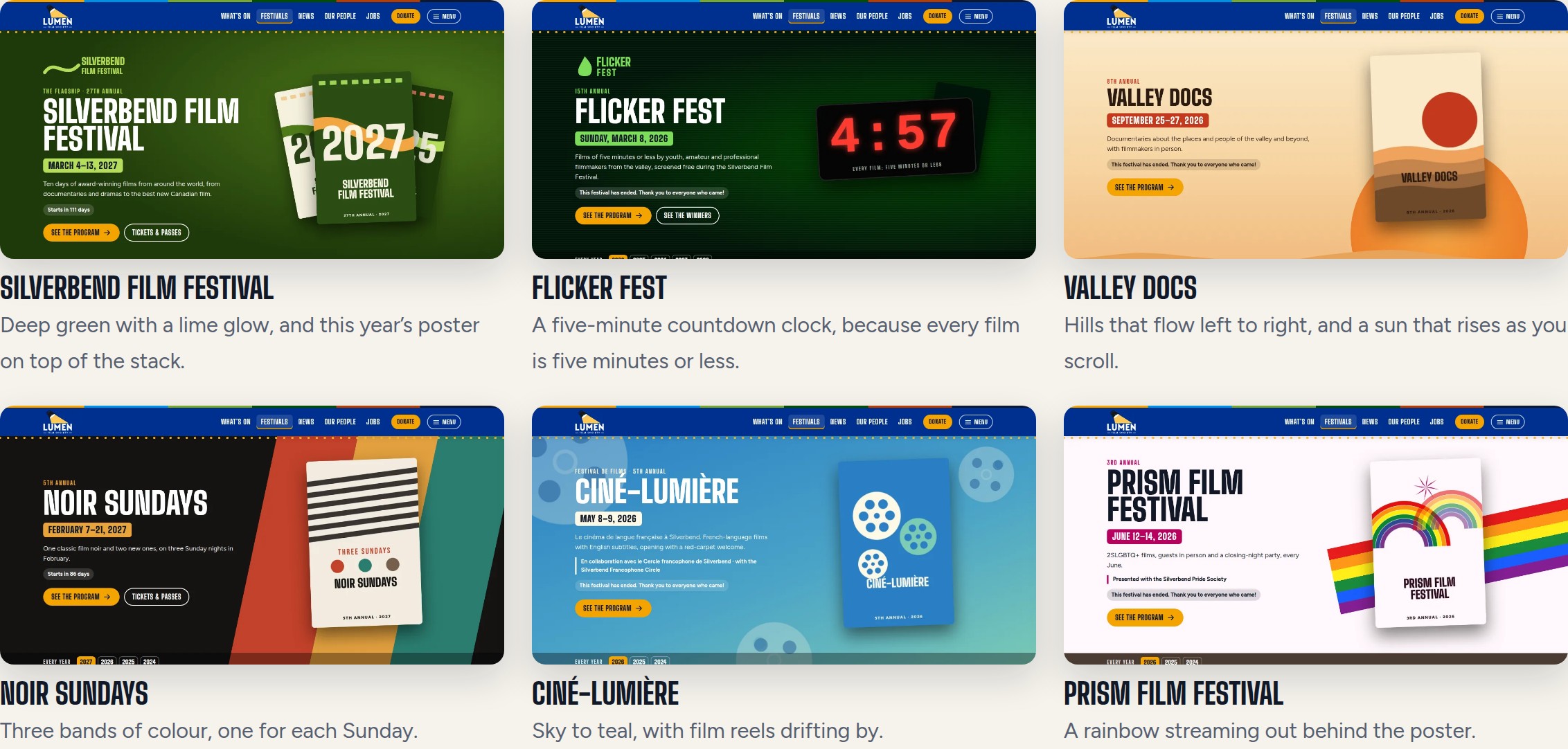
- Silverbend Film Festival: deep green with a lime glow, and this year’s poster on top of the stack.
- Flicker Fest: a five-minute countdown clock, because every film is five minutes or less.
- Valley Docs: hills that flow left to right, and a sun that rises as you scroll.
- Noir Sundays: three bands of colour, one for each Sunday.
- Ciné-Lumière: sky to teal, with film reels drifting by.
- Prism Film Festival: a rainbow streaming out behind the poster.
Every year, every poster
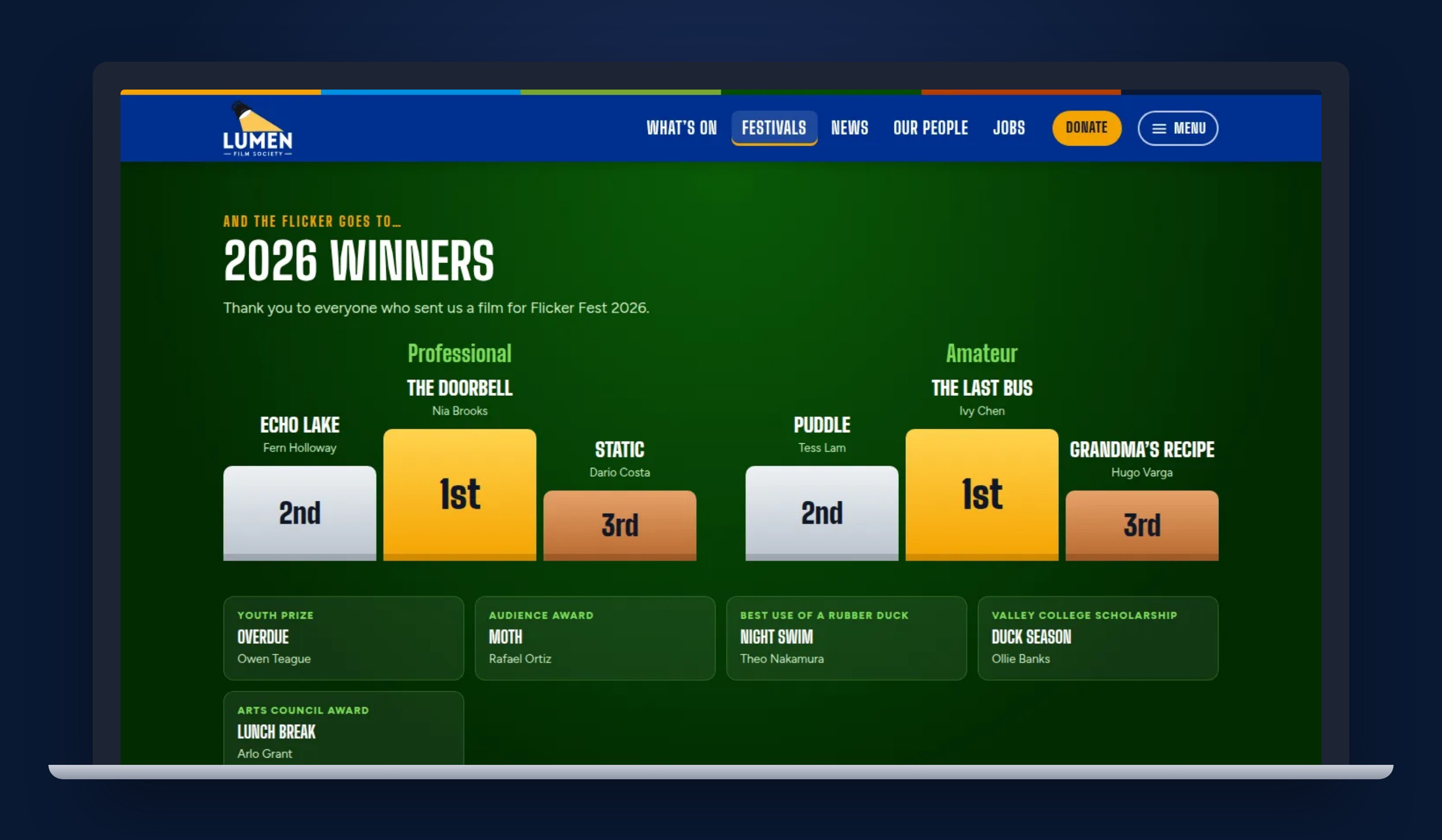
Each festival keeps its whole history: a strip of every year’s poster, and a page for each edition with its program, passes and sponsors. Flicker Fest’s winners go up on podiums, typed into the admin as a simple list.

The pages that keep the lights on
On a non-profit cinema’s website, “Become a member” and “Rent the theatre” matter as much as the showtimes. So each of those pages gets a small piece of theatre of its own.
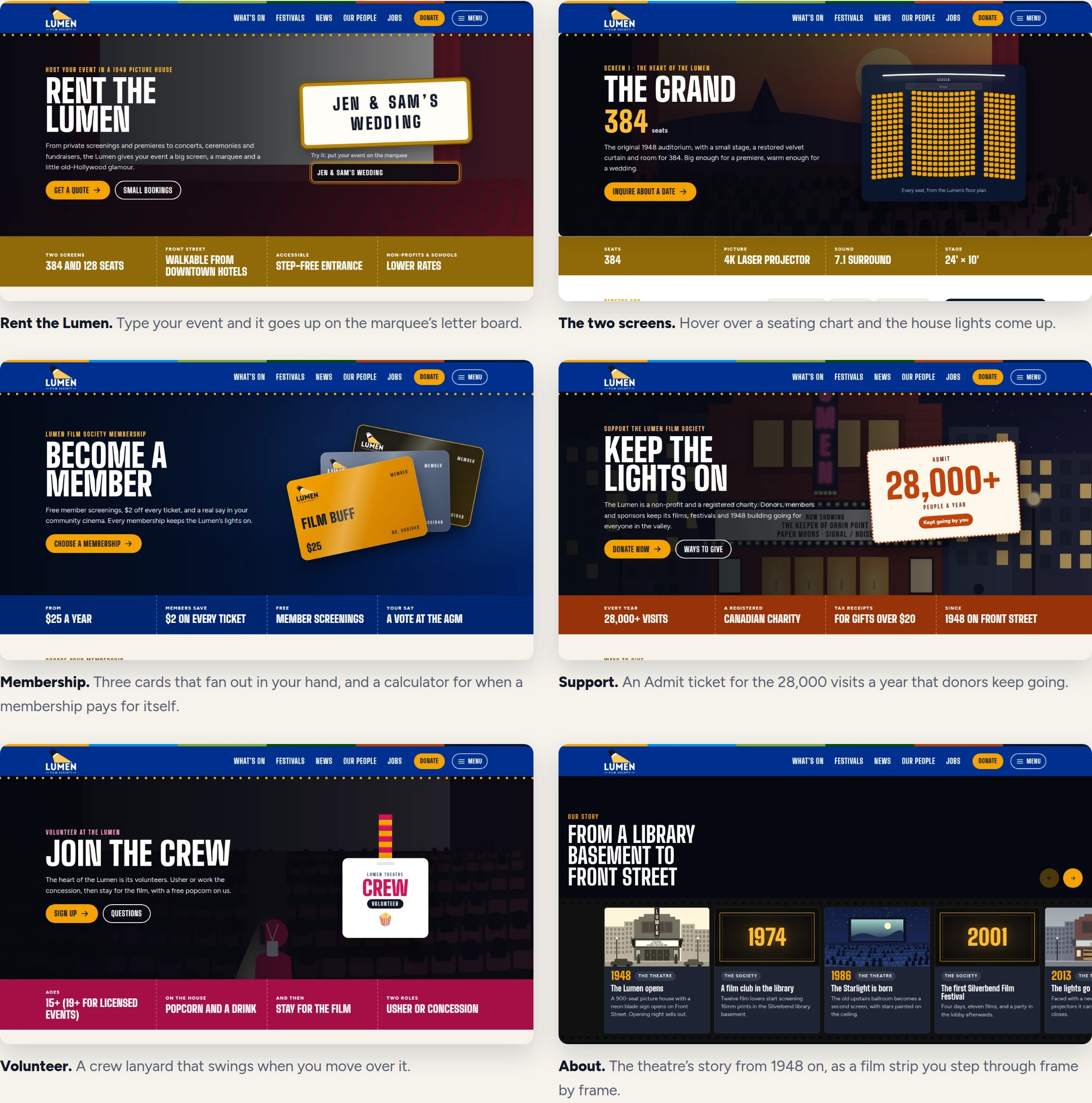
- Rent the Lumen. Type your event and it goes up on the marquee’s letter board.
- The two screens. Hover over a seating chart and the house lights come up.
- Membership. Three cards that fan out in your hand, and a calculator for when a membership pays for itself.
- Support. An Admit ticket for the 28,000 visits a year that donors keep going.
- Volunteer. A crew lanyard that swings when you move over it.
- About. The theatre’s story from 1948 on, as a film strip you step through frame by frame.
A season of films that don’t exist
Showing real films means showing real posters and trailers, and those belong to the studios. So the Lumen’s programme is invented: 15 films with directors, casts, ratings and running times, partner events and 30 festival editions. The opera and stage nights (La Bohème and Twelfth Night) are classics long out of copyright, in made-up productions.
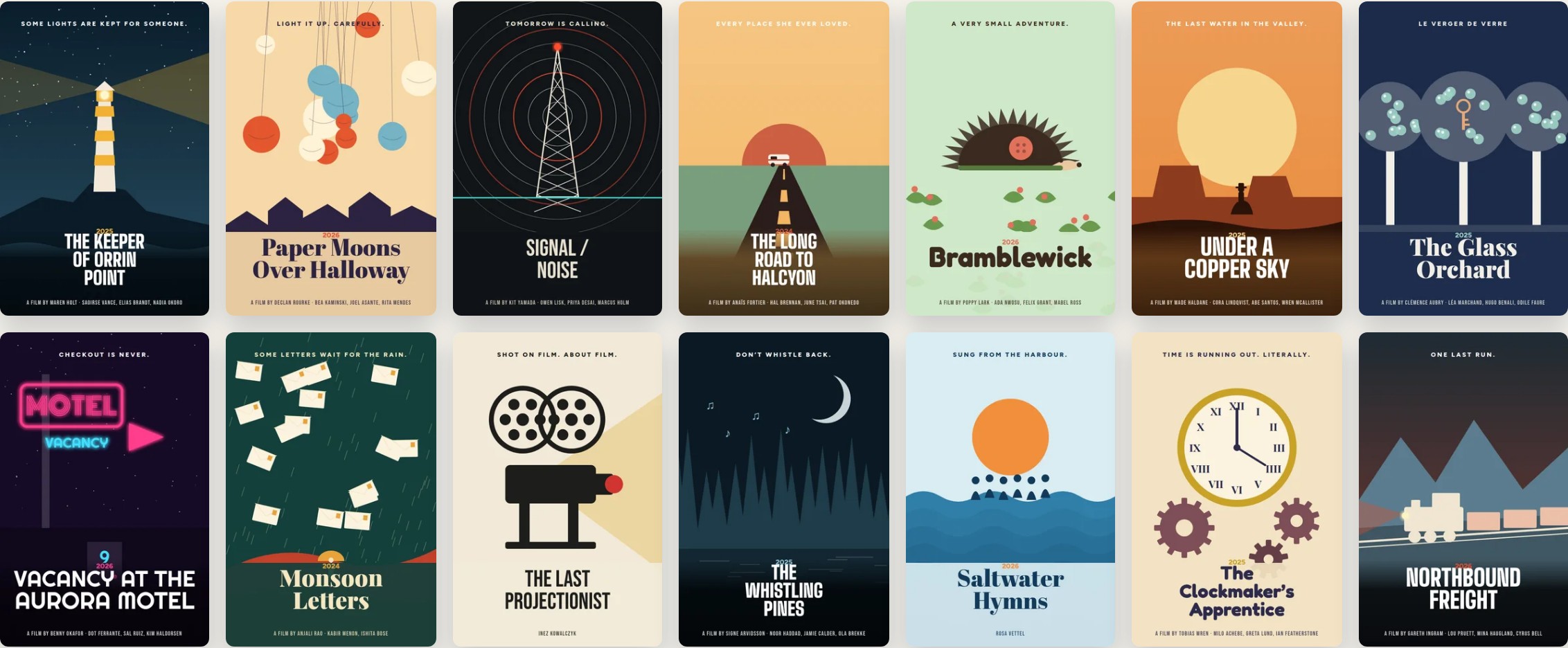
Every poster comes from one poster kit built with Claude Code: a few layouts, palettes and cut-paper motifs (a lighthouse, a radio tower, a hedgehog with a lost button). The festival posters, staff portraits and theatre scenes come from the same kit, so a season’s worth of art feels like one theatre. Each one also exists as a vector file I can redraw by hand.
Showtimes that never go stale
A portfolio piece gets looked at for years, but showtimes go stale in a day. A theatre site that says “Tonight” about last November looks abandoned.
Hosted as plain files, the site can’t check the date on a server. So the copy is drawn as of a Monday, every showtime date is marked, and a little script in the browser slides the whole programme forward to the week you’re visiting. It works like moving a timeline layer by whole weeks: every keyframe shifts, but each one lands on the same weekday, so the Thursday Film Club stays on Thursdays.
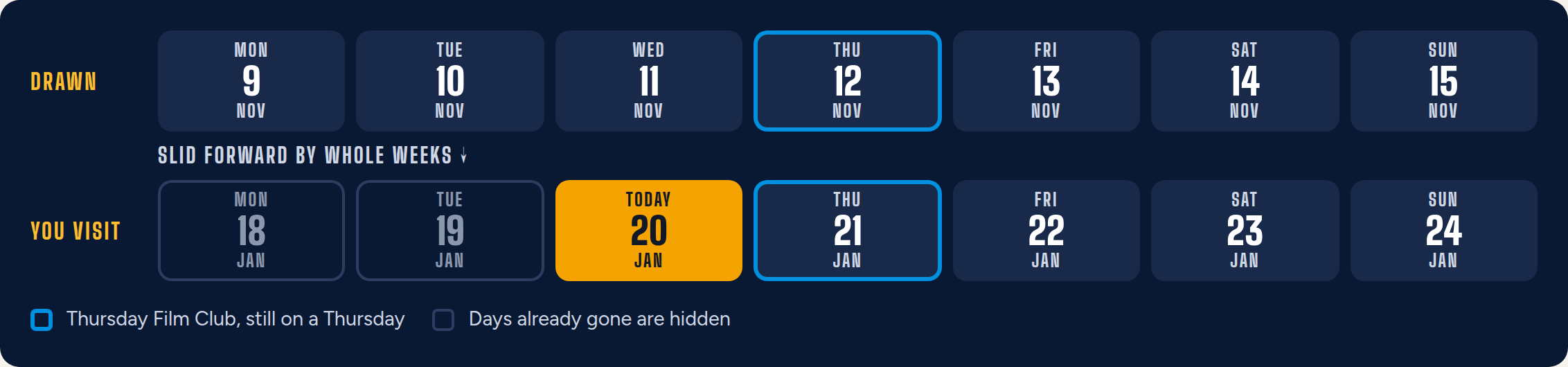
- Today and Tomorrow, worked out again from the visitor’s own calendar.
- Showings that have gone by are hidden, so the first thing you see is always still to come.
- The marquee is drawn once for each weekday, and the page keeps the one for today.
- Festivals keep their real dates. Their countdowns, “Starts in 18 days” or “On now”, are worked out in the browser.
Running it without a developer
Showtimes, sold-out status and ticket links come from the box office system, checked every ten minutes (in this concept, a pretend one). Everything the team adds on top, they do themselves in the admin.
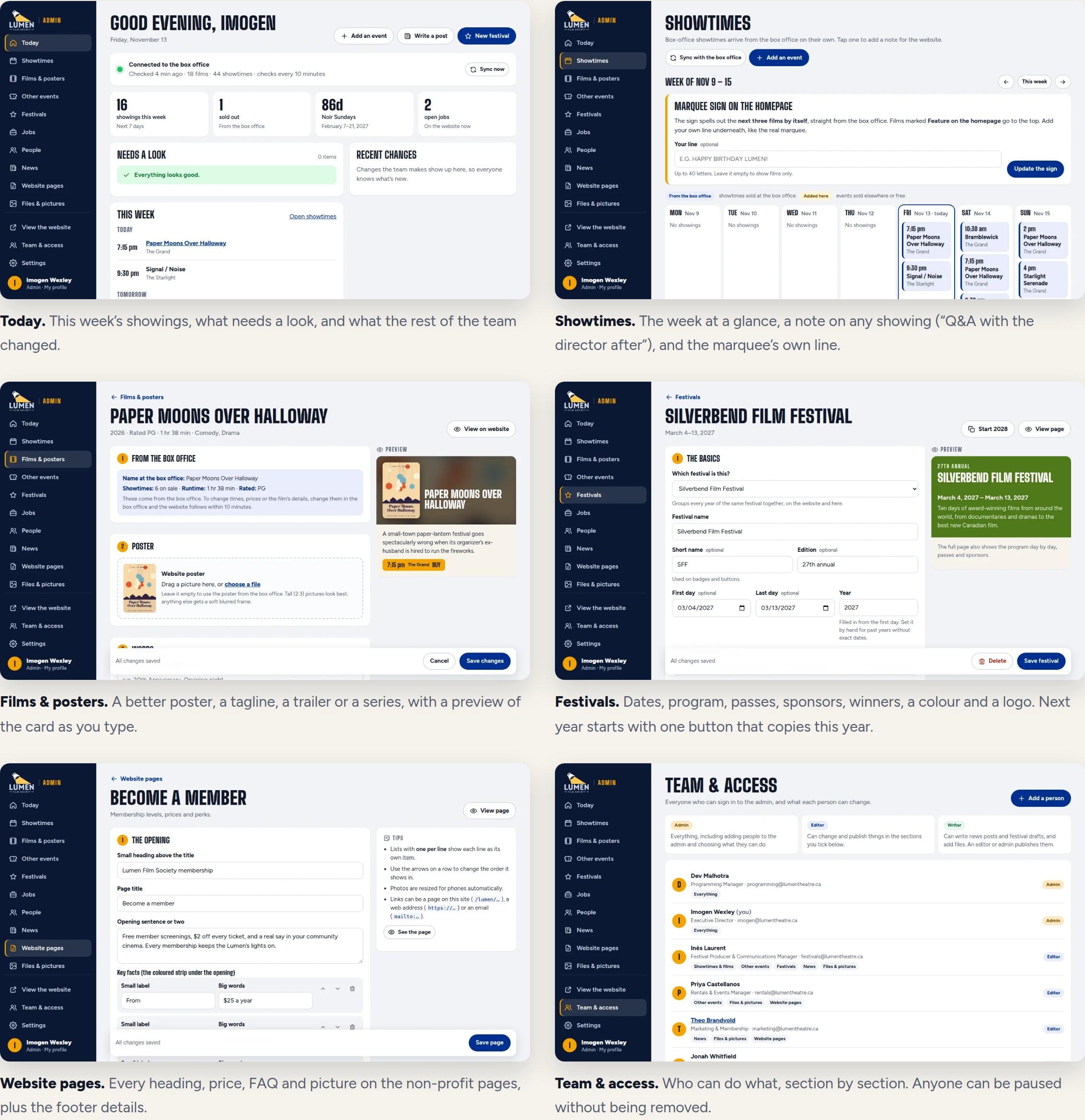
- Today. This week’s showings, what needs a look, and what the rest of the team changed.
- Showtimes. The week at a glance, a note on any showing (“Q&A with the director after”), and the marquee’s own line.
- Films & posters. A better poster, a tagline, a trailer or a series, with a preview of the card as you type.
- Festivals. Dates, program, passes, sponsors, winners, a colour and a logo. Next year starts with one button that copies this year.
- Website pages. Every heading, price, FAQ and picture on the non-profit pages, plus the footer details.
- Team & access. Who can do what, section by section. Anyone can be paused without being removed.
Who can do what: admins do everything. Editors work in the sections an admin ticks for them. Writers draft news and festival pages and upload pictures, and their drafts wait for an editor or admin to publish them.
Click around the admin. It’s a demo that opens signed in as Imogen, the executive director, and nothing saves.
Results
Google Lighthouse 12, simulated phone on 4G, November 2026. Each number is the middle of three runs. Accessibility, Best Practices and SEO* scored 100 on all six pages.
| Page | Speed | Main image appears | Downloads |
|---|---|---|---|
| Homepage | 99 | 1.8 s | 360 KB |
| What’s On | 99 | 1.7 s | 150 KB |
| Film page | 100 | 1.4 s | 130 KB |
| Festival page | 100 | 1.5 s | 150 KB |
| Membership | 100 | 1.4 s | 110 KB |
| Case study page | 99 | 2.2 s | 260 KB |
* With the one check this concept fails on purpose (the lock that keeps it off Google) counted as passing.
Beyond the scores, I had a browser open every page at phone and laptop width, looking for sideways scrolling, clipped text, broken images and script errors. I also walked every admin screen as a demo staff member, and opened the hosted copy on four different dates, from November to June, to check the showtimes moved with the calendar.
Refining it
I looked at every round the way I’d look at a pencil test, and sent notes back:
- Show off the festivals. Festivals are a big deal for a cinema, and the first festivals page was too plain. Now each festival gets its own opening, and the poster archive shows every year instead of stopping partway.
- Make it move. I asked for the Valley Docs hills to flow and for the volunteer lanyard to swing when you move over it.
- Tighter menu. The full menu went from a tall list to four neat columns, and two on phones.
- The phone pass. “Now showing” was hiding behind the badge on the marquee, the ticket’s words crowded together, and a festival banner took several thumb-flicks to scroll past. All three were fixed.
- The logo. I wasn’t a fan of the first one, so I drew my own. Then I asked for the beam to flicker, compared three strengths side by side, and picked “nearly out”.
The Lumen Theatre, the Lumen Film Society, Silverbend and every film, person and festival here are made up for this portfolio. Any resemblance to a real theatre is a coincidence.